
Rules, scoping, and SKU pattern matching with wildcards and child SKUs



Rules live at Sales > Product Messaging > Rules. Each rule is a SKU pattern list, a scope, and one or both of two actions: Send Email and Show Block on Success Page. At least one action must be on; each action’s fields are required only while that action is on.
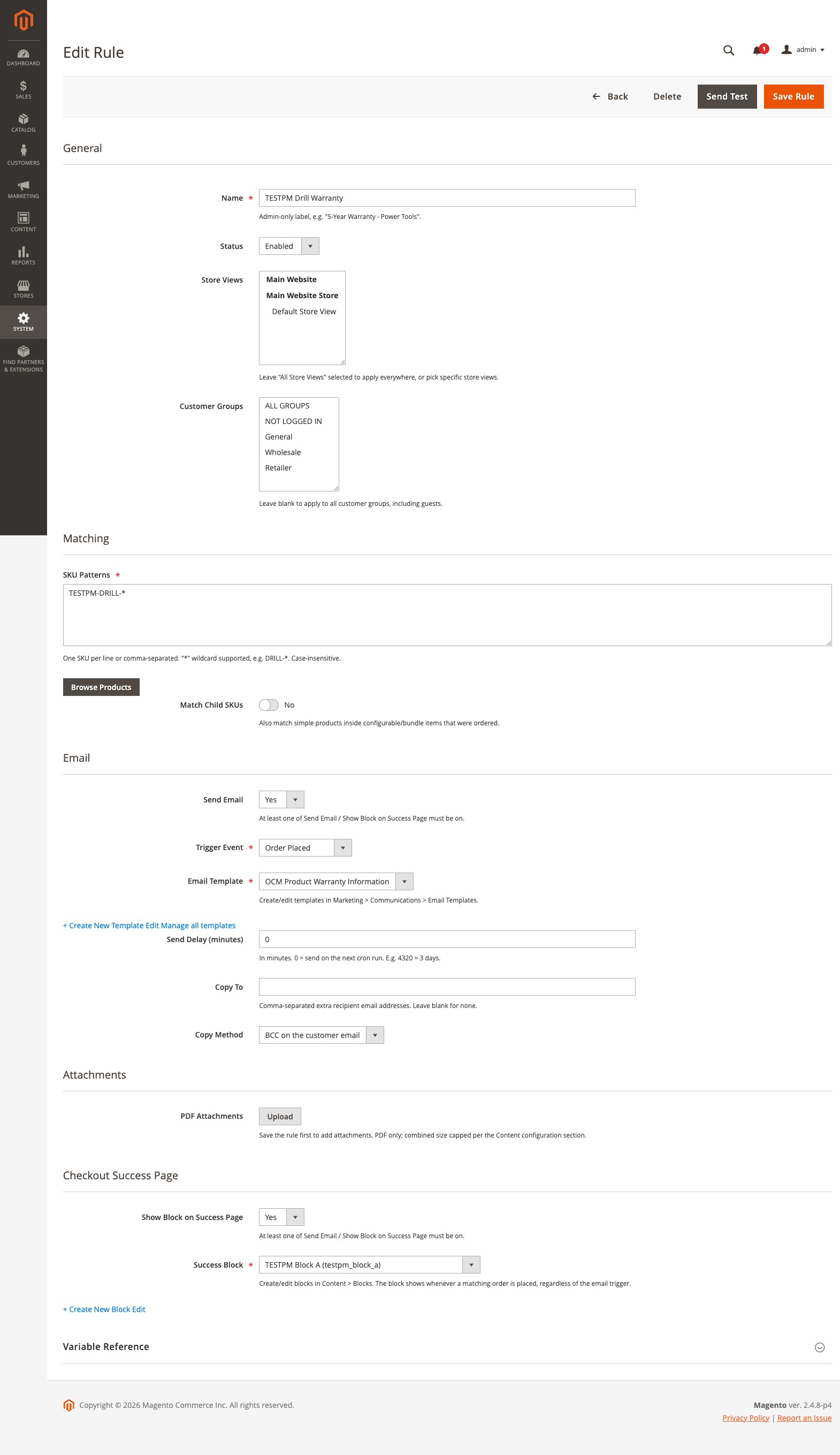
General
| Field | Description |
|---|---|
| Name | Admin-only label, for example “5-Year Warranty - Power Tools”. Available to email templates as rule_. |
| Status | Enabled or Disabled. |
| Store Views | Limit the rule to specific store views. A rule saved with no store views selected applies to all of them. |
| Customer Groups | Limit the rule to specific groups. Leave it empty to apply to every group, including guests (NOT LOGGED IN). |
Scope applies to both actions. A rule limited to the Wholesale group shows its success-page block and sends its email only for Wholesale orders.
SKU pattern syntax
The SKU Patterns field takes one SKU per line or a comma-separated list. Patterns are trimmed and matched case-insensitively, including accented and non-Latin SKUs.
- No
*means an exact match:DRILL-2000Xmatches only that SKU. *matches any run of characters:DRILL-*matchesdrill-2000xandDRILL-3000-PRO.*is the only wildcard;?,[and]are literal characters, so SKUs containing them can be targeted exactly.- A rule matches an order when any pattern matches any candidate SKU on any item.
The rule must contain at least one usable pattern to save.
Browse Products
Click Browse Products under the pattern list to open a filterable product grid. Filter by SKU or name, tick products, and click Add Selected. Their SKUs are appended one per line without disturbing wildcard patterns you have already typed, and a SKU already in the list is not added twice.
Matching child SKUs
Match Child SKUs is on by default. With it on, candidate SKUs for an ordered item include its children (the simple selected inside a configurable, the selections inside a bundle) and, when the ordered item is itself a child, its parent’s SKU. Grouped products are matched the same way. Turn it off when you want only the top-level SKU on the order line to count.
Which order lines count
- Fully cancelled or fully refunded order lines never trigger a rule. A customer is not sent a manual for a product they were never charged for.
- For the Shipment Created trigger, only the SKUs in that shipment count, not the whole order. See Email Triggers & Attachments.
- Success-page blocks are matched against the whole just-placed order.
The rule grid
| Column | Description |
|---|---|
| ID | Internal rule ID. Also the stacking order for success-page blocks. |
| Name | The admin label. |
| Actions | Badges for which actions are on: Email, Block, or both. |
| Trigger | The email trigger event, filterable. |
| SKU Patterns | The pattern list, truncated. |
| Template | The selected email template, by name. |
| Success Block | The selected CMS block identifier. |
| Delay | The configured send delay. |
| Status | Enabled or Disabled. |
| Updated | Last modification time. |
The grid supports column filters and the mass actions Enable, Disable, and Delete. Deleting requires the OCMLabs_ProductMessaging::manage_delete resource.
What rules do not do
Matching is a flat SKU list. There is no category, attribute, or condition-tree matching. An order that matches three email rules gets three separate emails; there is no digest mode. Every email goes to the order’s customer plus any Copy To addresses, so per-product recipient routing, such as notifying a vendor, is not supported.