
The Email Log, automatic retries, Resend, and testing rule emails safely



Every queued email, whether pending, sent, failed, or cancelled, is a row under Sales > Product Messaging > Email Log. The log is the queue: the send cron reads pending rows from the same table it records results in. Viewing it requires the OCMLabs_ProductMessaging::log resource.
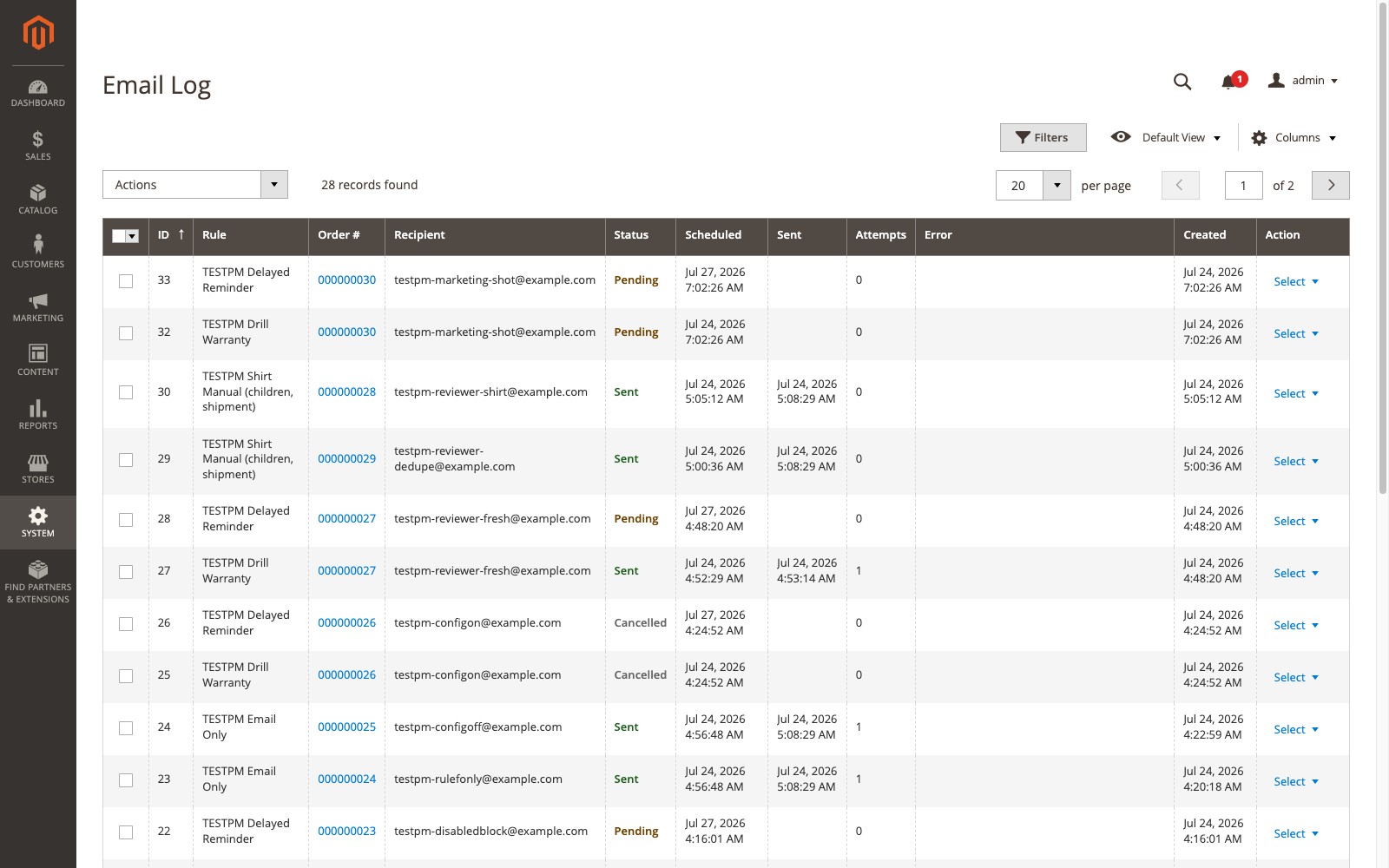
| Column | Description |
|---|---|
| ID | Log entry ID |
| Rule | The rule that queued the email |
| Order # | Links to the order view |
| Recipient | Resolved recipient address |
| Status | Pending, Sent, Failed, or Cancelled |
| Scheduled | When the email is or was due |
| Sent | When it actually sent |
| Attempts | Send attempts so far |
| Error | Truncated error message, if any |
| Created | When the row was queued |
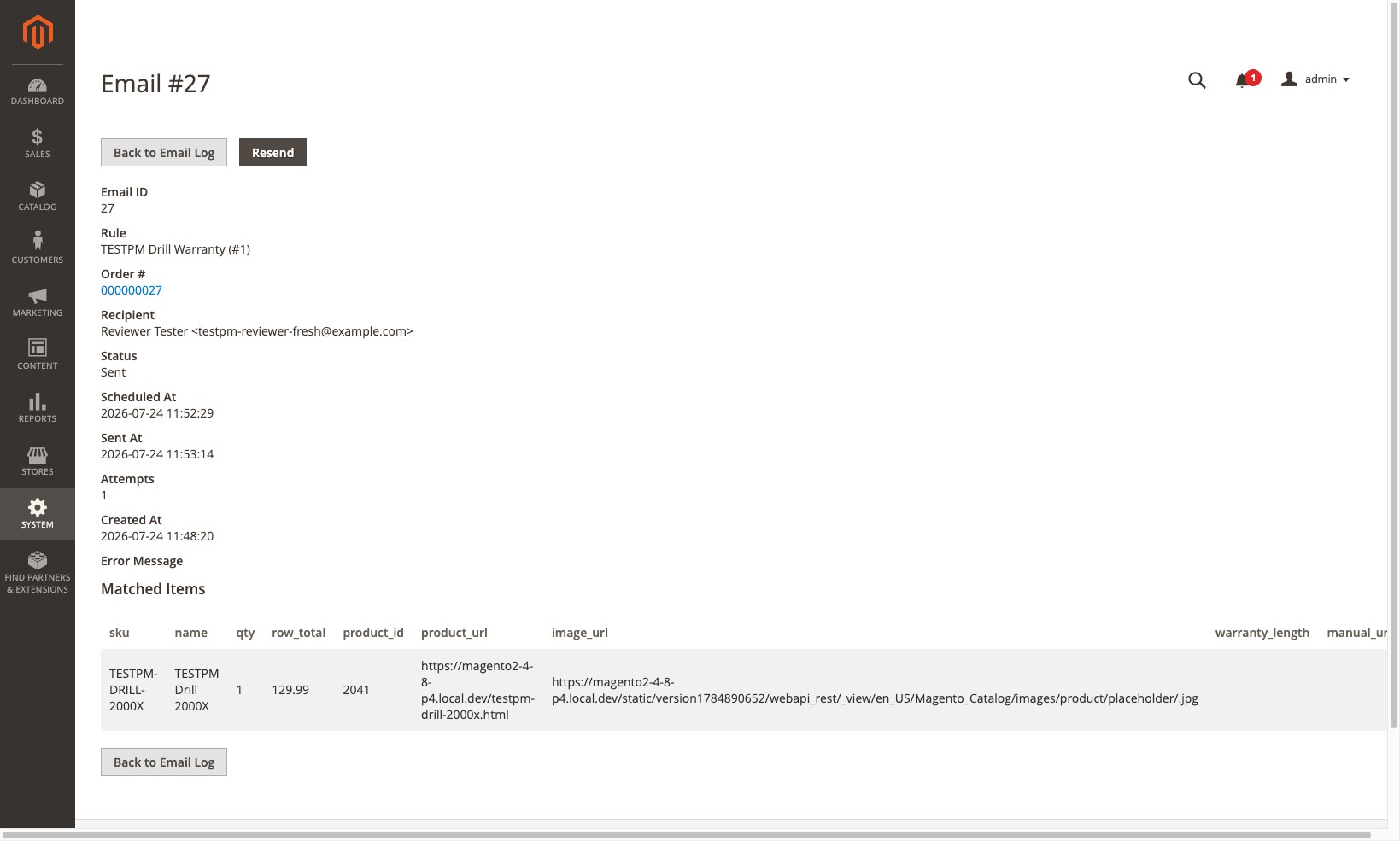
Click View on a row for the full record: the matched-item snapshot the email was rendered with and the complete error detail.
Sending and retries
The ocmlabs_productmessaging_send cron job runs every minute and processes up to Batch Size due rows. Each row is sent in isolation, so one bad row never blocks the rest of the batch. Each email is rendered in the order’s store view.
When a send fails, the attempt count goes up and the row is rescheduled after retry_delay * 2^(attempts-1) seconds. With the defaults (300 seconds, 3 attempts) that is 5 minutes, then 10, then Failed. A template that no longer exists fails at once with no retries. An email for a store view that has been deleted is resolved instead of retried indefinitely. An interrupted send, such as a timeout or a PHP restart mid-batch, does not produce a duplicate email on the next run.
Resend and Cancel
- Resend (row action or mass action, with a confirmation prompt) resets the existing row to Pending with attempts cleared and a new scheduled time. It does not insert a new row, so the one-email-per-rule-per-order guarantee and the audit trail both survive. Resend is guarded against the cron job processing the same row at the same moment.
- Cancel (mass action) stops pending rows from sending.
Retention
The ocmlabs_productmessaging_prune job runs daily at 2:45 AM and deletes sent, failed, and cancelled rows older than Log Retention (days), default 90. Pending rows are never pruned. Set retention to 0 to keep everything.
Send Test vs Test Mode
These are easy to confuse and do different jobs.
Send Test is a button on the rule form. It sends one email immediately to the address you type, using the rule’s current form state, including unsaved changes, against the most recent matching order in the rule’s own store views. If no order matches, it falls back to the most recent order in those store views, warns you, and sends with no matched items rather than inventing data. Send Test ignores Test Mode, never touches the queue, and is not written to the Email Log. Use it while writing a template.
Test Mode is a configuration switch for staging environments. While it is on, every real queued email goes to the Test Mode Recipient instead of the customer, and the log records the original recipient with a note that it was diverted. Use it so a copy of production data cannot email real customers, and turn it off before go-live. See System Settings.