
What a Magento 2 SEO Extension Should Do, and How to Test One
What a Magento SEO extension should do as you edit: a live 0-100 score, an 18-check list with fix hints, a Google preview, and a buyer's test for demos.

A good SEO extension does its real work on the edit screen. It should score a product, category or CMS page while the editor is still typing, say which check failed and how to fix it, and add the head-tag controls Magento does not ship. Templates and tags are the easy half. Before the criteria, a disclosure: we build SEO Suite, a Magento 2 SEO extension, so read what follows knowing who wrote it. Every test in this post is written to work on any extension, and the demo table near the end includes rows our own module could fail.
What SEO features does Magento offer out of the box?
Magento does more for SEO natively than its reputation suggests. It stores clean meta data, generates URL rewrites and an XML sitemap, and has store-level switches for canonical tags and default robots. What it lacks is the editorial layer.
| MAGENTO OUT OF THE BOX | WHAT AN EXTENSION ADDS | |
|---|---|---|
| META TITLE, DESCRIPTION AND KEYWORDS | Fields in the Search Engine Optimization section of the product, category and CMS page edit screens | Live scoring of what is typed into those fields, with character counts |
| URL KEY AND URL REWRITES | A URL key on each entity, with URL rewrites generated and managed natively | A check that the focus keyword appears in the URL key; rewrites can stay native |
| META TEMPLATES | Product-only masks under Stores > Configuration > Catalog > Catalog > Product Fields Auto-Generation, set at global scope only, which fill the product's stored meta fields | Title and description templates for products, categories and CMS pages, rendered at page time and never written back |
| CANONICAL TAGS | Configuration options for product and category canonicals (catalog/seo/product_canonical_tag, catalog/seo/category_canonical_tag) | One canonical per page, a choice of product canonical path, and handling for filtered and paginated category pages |
| ROBOTS META | One store-wide default (design/search_engine_robots/default_robots) | Robots on each page, plus rules for search results, filtered categories and paginated categories |
| HREFLANG | No hreflang setting in the native Catalog SEO configuration | Hreflang across store views, with an x-default store view and a locale override |
| STRUCTURED DATA | Product microdata in the Luma and Hyva themes, and an og:* block that core outputs on product pages | JSON-LD for Product, BreadcrumbList, Organization and WebSite |
| XML SITEMAP | Generated natively | Nothing; leave it to Magento |
| FOCUS KEYWORD, CONTENT SCORE, CHECKLIST | None | A focus keyword field, a 0-100 score and a check list with fix hints |
| SEARCH-SNIPPET PREVIEW | None | A desktop and mobile Google results preview with inline editing |
| CATALOG-WIDE SEO OVERVIEW | None | A grid of page scores with flags for missing or duplicate data |
Magento keeps SEO data in good order and tells the person typing it nothing about whether it is any good. A senior marketer hand-writing a few landing pages can live without that feedback. A catalog team pushing a season of color variants through the admin cannot, because nobody rereads the meta description of yet another variant. That gap is where a Magento SEO module belongs, and a demo that spends most of its time on sitemaps and rewrites is selling you features you already own.
What a Magento 2 SEO extension should show on the edit screen
The analysis belongs on the form where the editor already works. In SEO Suite, the SEO Score panel sits on the product, category and CMS page edit screens, directly above Magento's own Search Engine Optimization section. An admin user needs the Live Analysis ACL resource, OCMLabs_Seo::analyze, and both the module and the edit-screen panel have to be switched on in configuration. This is the Yoast-style part of an extension, and it is the part a catalog team touches every day.
The panel starts with keywords: one focus keyword and up to four secondary keywords, comma separated. Only the focus keyword is scored. Secondary keywords are saved next to it as a record of the other terms the page is meant to cover, but no check reads them. Leave the focus keyword empty and every keyword check is skipped while "Focus keyword set" fails, which means the page practically cannot reach Good.
Then the score. Each check carries a weight, passed checks count their full weight, warnings count half, and the sum is divided by the total weight of the checks that apply to that page before scaling to 0-100. Skipped and non-applicable checks drop out of both sides of the division, so no page is marked down by a check that does not apply to it. Below 50 is Poor. From 50 to 79 is OK, and 80 or above is Good.
Timing is the thing to test hardest. The analysis runs on the server, debounced as the editor types, against the unsaved values in the form, and it never saves anything. Change the meta title and the score moves before anyone presses Save.
Saving still matters. SEO Suite scores the page again after the save commits, and if scoring throws an error, the error is logged and the save goes through. That order is right: an SEO tool should never be the reason a price change failed to save.

A nightly report would catch the same weak title after the page went live. The panel catches it while the page is still a draft, when the fix is one edit. The SEO panel documentation covers every setting behind it.
Which content checks should a Magento SEO module run?
These are SEO Suite's 18 checks. Ask any vendor to put its own list on screen at this level of detail. Every threshold below is a default, and all of them can be changed under Stores > Configuration > OCM Labs > SEO > Analysis.
| CHECK | DEFAULT RULE | WEIGHT | APPLIES TO | |
|---|---|---|---|---|
| 1 | Focus keyword set | A focus keyword has been entered | 10 | All |
| 2 | Keyword in title | Found in the meta title, or the name when the title is empty. Passes at the start, warns anywhere else, fails when missing | 10 | All |
| 3 | Keyword in description | Found in the meta description | 8 | All |
| 4 | Keyword in URL | Found in the URL key | 6 | All |
| 5 | Keyword in intro | Found in the first paragraph of the content | 6 | All |
| 6 | Keyword in subheading | Found in at least one H2 or H3 | 4 | All |
| 7 | Keyword density | 0.5% to 2.5% passes, outside that range warns, absent fails | 6 | All |
| 8 | Keyword in image alt | Found in the alt text of at least one image | 4 | Products, CMS pages |
| 9 | Unique focus keyword | No other item of the same type in the same store view uses it | 6 | All |
| 10 | Title length | 30-60 characters passes, 20-70 warns, anything else fails | 8 | All |
| 11 | Description length | 120-160 characters passes, 70-180 warns, anything else fails | 8 | All |
| 12 | Content length | At least 150 words on a product, 100 on a category, 300 on a CMS page | 8 | All |
| 13 | Images have alt text | Every content image has alt text; skipped when there are no images | 4 | All |
| 14 | Internal links | At least one link to another page on the store | 3 | Categories, CMS pages |
| 15 | Outbound links | At least one external link; advisory, so it can warn but never fails | 1 | CMS pages |
| 16 | Reading ease | A Flesch score of 60 or more passes, 30 or more warns | 4 | All, English store views only |
| 17 | Sentence length | No more than 25% of sentences run past 20 words | 2 | All, English store views only |
| 18 | Paragraph length | No paragraph over 150 words | 2 | All store views |
The weights add up to 100. Read the table as the editor's three jobs: setting the keyword is checks 1 and 9, writing the title and description is checks 2, 3, 10 and 11, and writing the body is everything else. Title and description work carries 34 of those 100 points, which is where a tired editor should start. Eighteen checks can look like box-ticking on a product whose description is mostly a spec table. The weights answer that: the box-ticking checks are the cheap ones.
Look at check 7 first in any demo. Density above 2.5% warns. A check list that only ever rewards more keyword is a stuffing machine, and an editor chasing a green score will work "canvas tote" into every sentence until the copy reads like a parts list. A ceiling on density is what separates guidance from an incentive to spam.
Check 9 catches the problem catalog teams create without noticing. Two products with the same focus keyword compete for the same query, and a range of near-identical variants produces exactly that by default. The check fails every page sharing the keyword once each is scored, and the SEO Dashboard's Duplicate focus keyword flag lands on a page only when that page is scored. Here is what breaks: give a second product a keyword an earlier page already uses, and only the second product is flagged. The earlier page keeps its Pass until it is saved again or a full bin/magento ocmlabs:seo:rescore runs, because the nightly cron re-scores only pages changed since their last score.
Every row in the panel shows its status (Passed, Warning, Failed or Skipped), a message with the measured value and its weight, plus a one-line fix hint on any check that did not pass. Showing the weight changes what gets fixed first. An editor who can see that the title check is worth 10 and image alt text is worth 4 fixes the title.
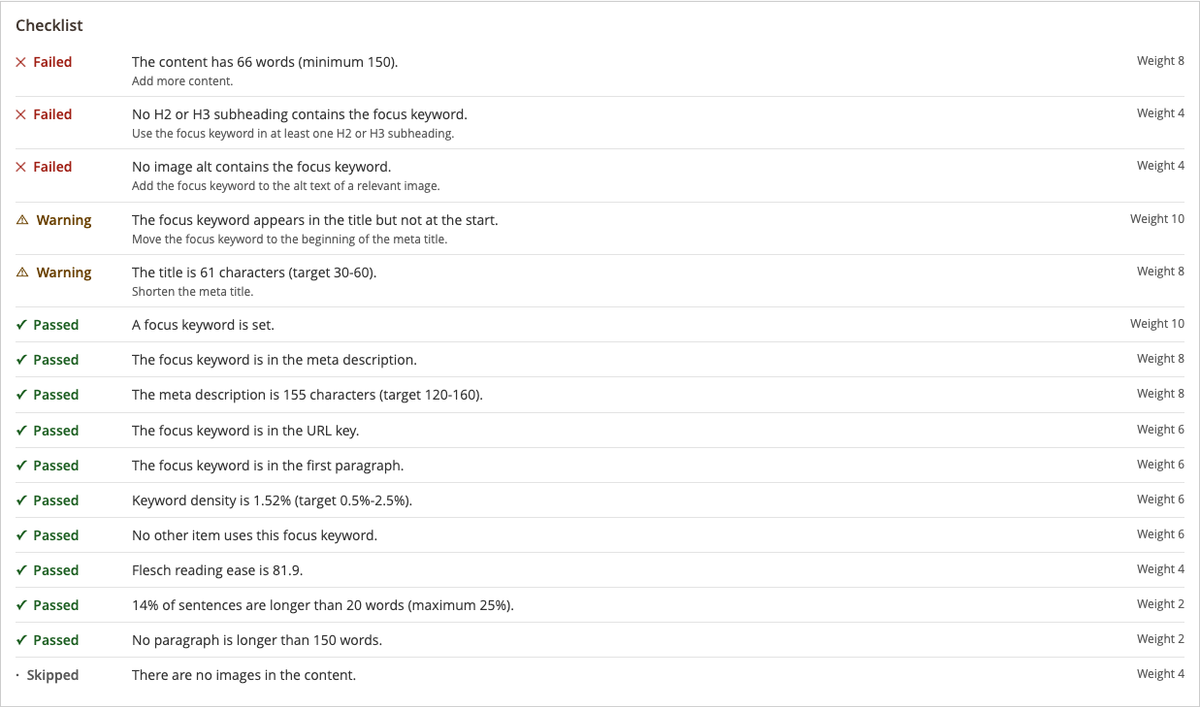
Three checks apply only to some page types. Keyword in image alt skips categories, internal links skip products, and outbound links count only on CMS pages. Content, Page Builder markup included, is converted to plain text before any check runs, so a Page Builder row full of nested wrappers is measured on its words.
Pages nobody opens get scores too. bin/magento ocmlabs:seo:rescore --only-unscored works through them in batches of 500 and exits non-zero if any page fails, and a nightly cron at 03:00 re-scores whatever changed. Changing a threshold does not re-score stored pages, so after a threshold change run bin/magento ocmlabs:seo:rescore without --only-unscored and the Dashboard reflects the new rules.
Does the search-snippet preview match what Google shows?
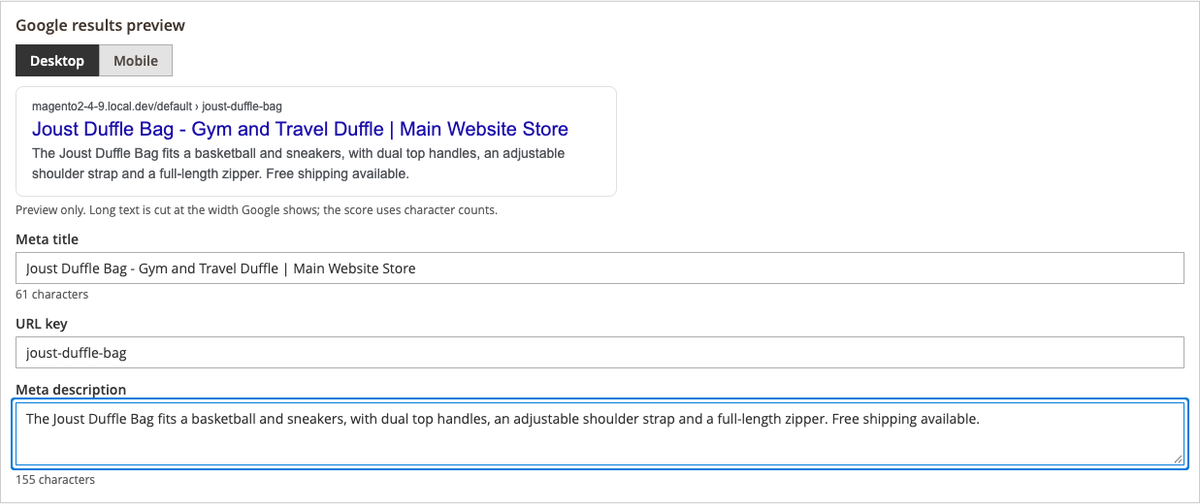
Close enough to edit against, never close enough to promise. SEO Suite's preview has a Desktop and Mobile toggle, with the meta title, URL key and meta description underneath as editable fields with live character counts. Those fields are bound to Magento's own fields, so typing in the preview is typing in the product. Nothing is copied into a second store of meta data that could drift.
Long text is cut at roughly the width Google uses, measured with the browser's own text metrics. That cut is display-only and approximate, because truncation shifts with device and rendering. The score ignores it: the length checks count characters, so a title passes at 30-60 characters and a description at 120-160, whatever the preview's ellipsis does. Google may also replace a title link with other text on the page when it judges the <title> a poor description of the page, and it often builds the snippet from page text that matches the query, so no preview can guarantee the final result.
Below the search preview sits a social preview with Social Title, Social Description and Social Image overrides. Leave them empty and the social card falls back to the meta title and description.
How readability checks treat a 150-word product versus a 300-word CMS page
Short product copy is where content length and reading ease pull against each other. A technical product described in 150 words of model names and measurements will often warn on reading ease. A spec-heavy product will never read like a blog post, and the weights allow for it: reading ease carries 4 points and sentence length 2, so a warning on either costs little.
Rows 12 and 16-18 of the check table hold the thresholds, and only content length changes by page type: 150 words on a product, 100 on a category and 300 on a CMS page. Reading ease and sentence length run on English store views only. On any other store view the panel skips them and tells the editor why, so a German or French product is not penalized by an English formula. Paragraph length is the exception people get wrong: it counts words, which works in any language, so it runs on every store view.
On a large catalog, start with the category pages that carry navigation traffic, then CMS landing pages, then the product long tail.
Templates for the pages nobody will hand-write
Templates are for the long tail, and hand-written fields are for the pages that bring in traffic. SEO Suite has one title template and one description template each for products, categories and CMS pages, set at default, website or store view scope under Stores > Configuration > OCM Labs > SEO > Meta Templates. The variables are {{name}}, {{sku}}, {{price}}, {{category}}, {{parent_category}}, {{store_name}}, {{sep}} (a pipe by default) and {{attribute:<code>}} for core text attributes and any attribute set Visible on Catalog Pages on Storefront. {{sku}} and {{price}} apply to products only.
If the product, category or page has its own meta title or description, that renders. The template fills only an empty field, it does that at render time, and nothing is written back to the entity.
That is the real difference from Magento's own product masks. A mask writes a value into the product and leaves it there, so a store rename or a new separator has to be pushed back through every product it touched, and the mask itself is set at global scope only. A render-time template changes everywhere once the configuration is saved and the full page cache is flushed, and it covers categories and CMS pages too. It can also differ by website or store view.
The block below illustrates template inputs and the rendered result for one made-up product, using the two default product templates. It is not an export, not an API response and not anything the module emits; it is here so you can watch {{attribute:short_description}} turn into a sentence while meta_description stays empty.
{
  "product": {
    "name": "Example Canvas Tote",
    "sku": "EXAMPLE-TOTE-01",
    "url_key": "example-canvas-tote",
    "meta_title": "",
    "meta_description": "",
    "short_description": "A canvas tote with a zip pocket and leather handles."
  },
  "store_name": "Example Store",
  "templates": {
    "product_meta_title": "{{name}} {{sep}} {{store_name}}",
    "product_meta_description": "{{name}} at {{store_name}}. {{attribute:short_description}}"
  },
  "rendered_at_page_time": {
    "meta_title": "Example Canvas Tote | Example Store",
    "meta_description": "Example Canvas Tote at Example Store. A canvas tote with a zip pocket and leather handles."
  }
}
The panel scores the page's own fields, so a page living on its template shows an empty description to the checks. Keyword in description fails, description length fails, and the score drops, even though the storefront shows a perfectly readable templated description. Read the low score as a signal that the page still lacks hand-written meta.
Defaults are a starting point, not copy. The category description default, Shop {{name}} at {{store_name}}., reads like the placeholder it is, and the CMS description default is empty, so hand-write the top categories and the landing pages. The meta templates documentation lists every variable with examples.
The technical layer: canonical, robots, hreflang and structured data
An extension should own canonical and robots completely or leave them alone, because half ownership is how a page ends up with two canonical tags. With Manage Canonical Tags on, SEO Suite removes core's canonical before adding its own, so each page carries exactly one. Product canonicals can drop the category path (the default), use the shortest path or use the first category path, and filtered and paginated category pages get their own canonical handling.
Robots work at two levels. Each page can use the default or be set to index, follow, noindex, follow or noindex, nofollow. Global rules put catalog search results on noindex, follow, and filtered category pages ship on noindex, follow too. We recommend setting filtered category pages to "Use Default (inherit)" so they rely on the canonical to the unfiltered category alone, because a noindex paired with a canonical that points at another URL sends Google mixed signals. Paginated category pages keep the category's own robots value, or Magento's default when none is set.
Hreflang runs across store views and is off by default, with an optional x-default store view and a locale override. Open Graph and Twitter card tags complete the head.
SEO Suite outputs JSON-LD Product with Offer and brand (the manufacturer attribute by default), plus GTIN and MPN once their attributes are mapped in the module's settings, and adds aggregateRating and up to five reviews when approved reviews exist. BreadcrumbList is output too, Organization and WebSite with SearchAction go on the home page, and theme Product microdata is left in place. The field-level detail is in our guide to Magento rich snippets, and the configuration side of this whole layer is covered in the Magento SEO guide.
How do you evaluate an SEO extension for Magento in a demo?
Magento SEO extensions are hard to tell apart on a feature list. They separate when you make the vendor click instead of talk, on a staging store, with your own catalog. Run these tests in a live demo or on a staging install, and write down the answers.
| WHY IT MATTERS | THE TEST TO RUN IN A DEMO | |
|---|---|---|
| EDIT-SCREEN COVERAGE BY ENTITY TYPE | An extension that only scores products leaves category and CMS landing pages unchecked | Open a category and a CMS page, not just a product, and look for the same panel |
| ANALYSIS ON UNSAVED VALUES | A score that refreshes only after Save turns editing into trial and error | Type in the meta title field and watch whether the score moves before you press Save |
| CHECK TRANSPARENCY | An editor cannot fix a check they cannot read | Fail a check on purpose and confirm the panel shows the rule, the threshold, the status and a fix hint |
| CONFIGURABLE THRESHOLDS | Your catalog's normal length and tone are not the vendor's | Change one threshold in configuration, then ask how existing stored scores get updated |
| FOCUS KEYWORD UNIQUENESS | Two pages chasing one keyword compete with each other | Give two products the same focus keyword in the same store view and see whether both are flagged |
| MULTI-STORE AND LANGUAGE BEHAVIOR | Reading-ease formulas are tied to one language | Switch to a non-English store view and see what the readability checks do: score, skip with a reason, or produce a number that means nothing |
| BULK VIEW | Nobody opens every page | Ask for a list of the weakest pages, and for a way to score pages nobody has opened, from the admin or the command line |
| MAGENTO AND PHP VERSION RANGE | A compatibility claim without numbers cannot be checked | Get both ranges as version numbers, then ask what Composer does on an unsupported Magento version |
| HYVA | Storefront output and the admin UI are separate problems | Ask for the storefront compatibility package by name, and whether the admin side needs anything at all |
| FRONTEND WEIGHT | SEO output ships with every page view | View source on a cached product page and count the tags and scripts it adds; ask about database reads on each request, cache tags, and whether scoring clears the page cache |
| CONFLICTS | Two modules setting canonical means duplicate tags or a silent winner | Ask which head tags it takes over, whether it removes core duplicates, and what you switch off when another module sets the same tags |
| EXIT PATH | Every module gets uninstalled eventually | Ask where the meta data lives and what is left after uninstall; confirm titles and descriptions stay in Magento's own fields |
Two rows decide most evaluations: unsaved-value analysis and conflicts. The first tells you whether editors will still use the tool once the novelty wears off. The second tells you whether it breaks the head of every page on the day you install it. Our own module does not fully pass the Configurable thresholds row: a threshold change leaves stored scores where they were until the pages are re-scored.
What an SEO extension will not do for you
Quite a lot, and a vendor who says otherwise is selling a different product. SEO Suite does no rank tracking, no keyword research, no backlink analysis and no Search Console reporting. Those belong in the SEO tool your team already uses, not inside Magento.
It does not generate XML sitemaps or manage URL rewrites, because Magento does both natively. It has no redirect manager or 404 monitor, and it writes no AI content. FAQPage schema comes from our separate FAQ module, which sits with the rest of the range on the OCM Labs Magento extensions page.
Two limits sit inside the features themselves. Reading ease and sentence length score English store views only. And the score is guidance for the editor: a page in the Good band is a page whose title, description and body meet the rules in the table above, not a forecast of where it will rank. No setting in the module guarantees or predicts a ranking; the robots and canonical settings tell Google which URLs to index and which to treat as the main version, not where they rank.
Once the tool question is settled, the Magento SEO checklist is the audit list to run against the store itself.
If those tests leave you wanting the score on the edit screen and one owner for the head tags, SEO Suite is the extension we build for that job. It costs $250 for Magento Open Source and $500 for Adobe Commerce, installs with Composer, and Packagist access is granted with the purchase. The SEO Suite product page lists both editions.
✦ FAQ
What is the best SEO extension for Magento 2?+–
Is there Yoast SEO for Magento 2?+–
Does Magento have built-in SEO?+–
Will a higher SEO score improve my rankings?+–
Will an SEO extension slow down my Magento store?+–
Can I run two SEO extensions at the same time?+–
Shane Blandford
Founder of Orange Collar Media, a Denver ecommerce agency behind 800+ Magento and Shopify builds. In Magento since version 1.x - building, rescuing, and supporting revenue-critical stores since 2008.
✦ KEEP READING
Related from the Journal.
Magento 2 Rich Snippets: How to Set Up Product Schema That Validates
Magento 2 rich snippets, done by hand: Google's required Product properties, a JSON-LD block mapped to Magento data, and fixes for duplicate microdata.
Magento SEO Checklist for 2.4.x: Severity, Admin Path and a Verify Step for Every Item
A Magento SEO checklist for 2.4.x stores: 50 items, each with a severity, the admin path or bin/magento command, and a way to verify it passes.
Magento SEO: The Technical Setup Guide for 2.4.7 to 2.4.9
Magento SEO, set up path by path: canonical and robots settings, layered navigation rules, hreflang, JSON-LD and a Search Console index-bloat check.