
The SEO panel - live score, focus keywords, the 18-check checklist, and Google and social previews



The SEO Score panel sits on the edit screen of every product, category, and CMS page, above Magento’s own Search Engine Optimization section. It shows a live score, a checklist of what to fix, a Google results preview, and a social preview. The analysis runs on the server, debounced as you type, using the unsaved values in the form. It never saves anything; the page is saved only when you click Save as usual.
The panel appears for admin users with the Live Analysis permission (OCMLabs_Seo::analyze) while both Enable SEO Module and Enable SEO Panel on Edit Screens are Yes.
Keywords
Enter one Focus Keyword, the main phrase the page should rank for, and up to four Secondary Keywords, comma separated. The checklist’s keyword checks score against the focus keyword; secondary keywords are saved with the page alongside it.
Without a focus keyword, every keyword check is skipped and the Focus keyword set check fails, so the score reflects only the content checks. A page without a focus keyword practically cannot reach Good.
Score and bands

The score runs from 0 to 100:
score = (weight of passed checks + half the weight of warned checks) / total weight of the checks that apply, x 100
Skipped checks, and checks that do not apply to the type of page you are editing, are left out of both sides.
| Band | Score |
|---|---|
| Poor | below 50 |
| OK | 50 to 79 |
| Good | 80 and above |
A high score means the page follows common on-page practice. It is guidance for the editor, not a prediction of where the page will rank.
The checklist
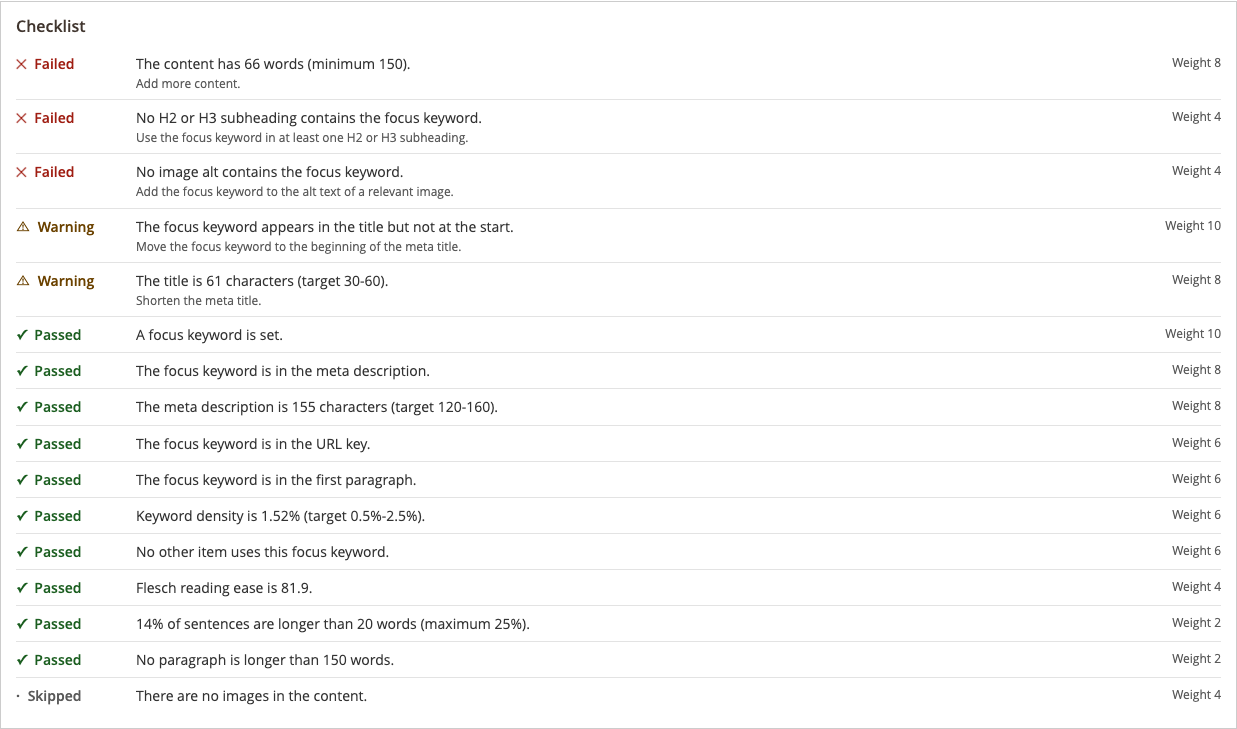
Each check shows Passed, Warning, Failed, or Skipped, a message with the measured value, a one-line fix hint, and its weight. The defaults below can all be changed under Stores > Configuration > OCM Labs > SEO > Analysis; see System Settings.
| Check | Rule (defaults) | Weight | Applies to |
|---|---|---|---|
| Focus keyword set | A focus keyword is entered. | 10 | All |
| Keyword in title | In the meta title, or the name if the meta title is empty. Passes at the start, warns elsewhere, fails if missing. | 10 | All |
| Keyword in description | In the meta description. | 8 | All |
| Keyword in URL | In the URL key. | 6 | All |
| Keyword in intro | In the first paragraph. | 6 | All |
| Keyword in subheading | In an H2 or H3. | 4 | All |
| Keyword density | 0.5% to 2.5% passes; outside the range warns; absent from the content fails. | 6 | All |
| Keyword in image alt | In at least one image alt text. | 4 | Products, CMS pages |
| Unique focus keyword | No other item of the same type in the same store view uses it. | 6 | All |
| Title length | 30 to 60 characters passes, 20 to 70 warns, otherwise fails. | 8 | All |
| Description length | 120 to 160 characters passes, 70 to 180 warns, otherwise fails. | 8 | All |
| Content length | At least 150 words for products, 100 for categories, 300 for CMS pages. | 8 | All |
| Images have alt text | Every image in the content has alt text. Skipped when there are no images. | 4 | All |
| Internal links | At least one internal link. | 3 | Categories, CMS pages |
| Outbound links | At least one external link. Advisory: warns, never fails. | 1 | CMS pages |
| Reading ease | Flesch reading ease of 60 or more passes, 30 or more warns. | 4 | All, English store views only |
| Sentence length | No more than 25% of sentences over 20 words. | 2 | All, English store views only |
| Paragraph length | No paragraph over 150 words. | 2 | All |
Content, including Page Builder markup, is converted to plain text before analysis, and empty content never causes an error; each check skips or fails according to its rule.
Readability on non-English store views
Two checks, Reading ease and Sentence length, are tuned for English and run only on store views whose locale is English. On other store views they are skipped, the panel says why, and they are left out of the score. Paragraph length counts words and runs on every store view.
Google results preview
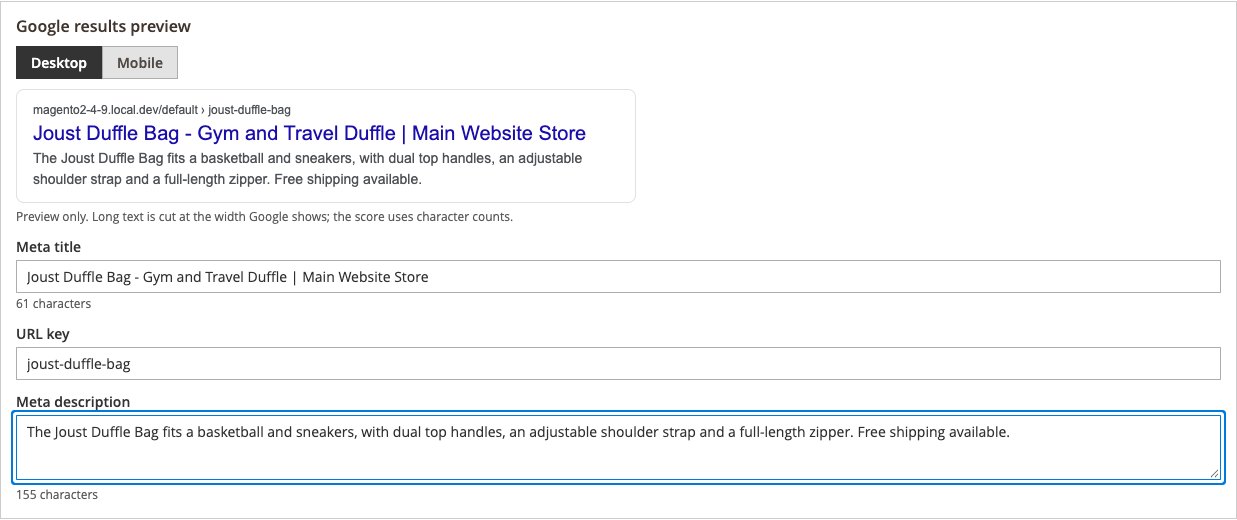
Switch between Desktop and Mobile. Edit the Meta title, URL key, and Meta description directly under the preview, each with a live character count. These are bound to Magento’s own fields, so editing the preview edits the real fields, and the change is saved with the page.
Long text is cut at roughly the width Google shows, using text metrics measured in the browser. That cut is display-only and approximate; Google’s real display varies by device. The score counts characters, not pixels.
Social preview
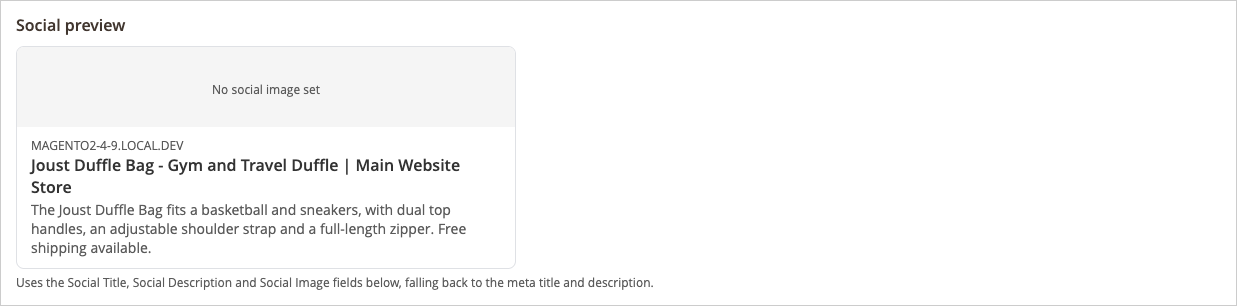
The social preview shows how the page looks when shared. Use Social Title, Social Description, and Social Image to override what is shared. Empty fields fall back to the meta title and meta description. The social image must be a path inside the media folder.
On the storefront, a product with no Social Image uses its base image for og:image. The admin preview does not show that fallback: it shows “No social image set” until you enter a Social Image. Categories and CMS pages share no image unless you set one. See Structured Data & Social.
Robots and canonical overrides
The panel also carries per-page Robots (Use Default, index, follow, noindex, follow, or noindex, nofollow) and Canonical URL fields. See Robots & Canonical.
Store views
On a store view, an SEO value you set (focus keyword, secondary keywords, robots, canonical, social overrides) overrides the default scope for that field only. An empty store-view value inherits the default. There is no all-or-nothing copy. Magento’s own meta fields keep their usual Use Default Value checkbox.
When is a page scored?
When you save a product, category, or CMS page, it is scored just after the save commits. If scoring has a problem, the error is logged and the save still succeeds. The panel, save-time scoring, the dashboard’s Re-score action, the command-line tool, and the nightly job all use the same analysis, so the score in the panel is the score the dashboard shows. Pages nobody has opened are scored by bin/magento ocmlabs:seo:rescore and the nightly job; see SEO Dashboard.
Accessibility
- The panel is operable from the keyboard.
- Score and band changes are announced to screen readers.
- Every band and every check status is shown with an icon and a text label, never color alone.
- The checklist is a real list, and the Desktop / Mobile toggle is a button group.