
The SEO Dashboard, bulk re-scoring from the command line, and the nightly re-score job



The SEO Dashboard at Marketing > SEO & Search > SEO Dashboard lists products, categories, and CMS pages in one grid, so you can see which pages need work without opening them one by one. Viewing it requires the OCMLabs_Seo::dashboard resource.
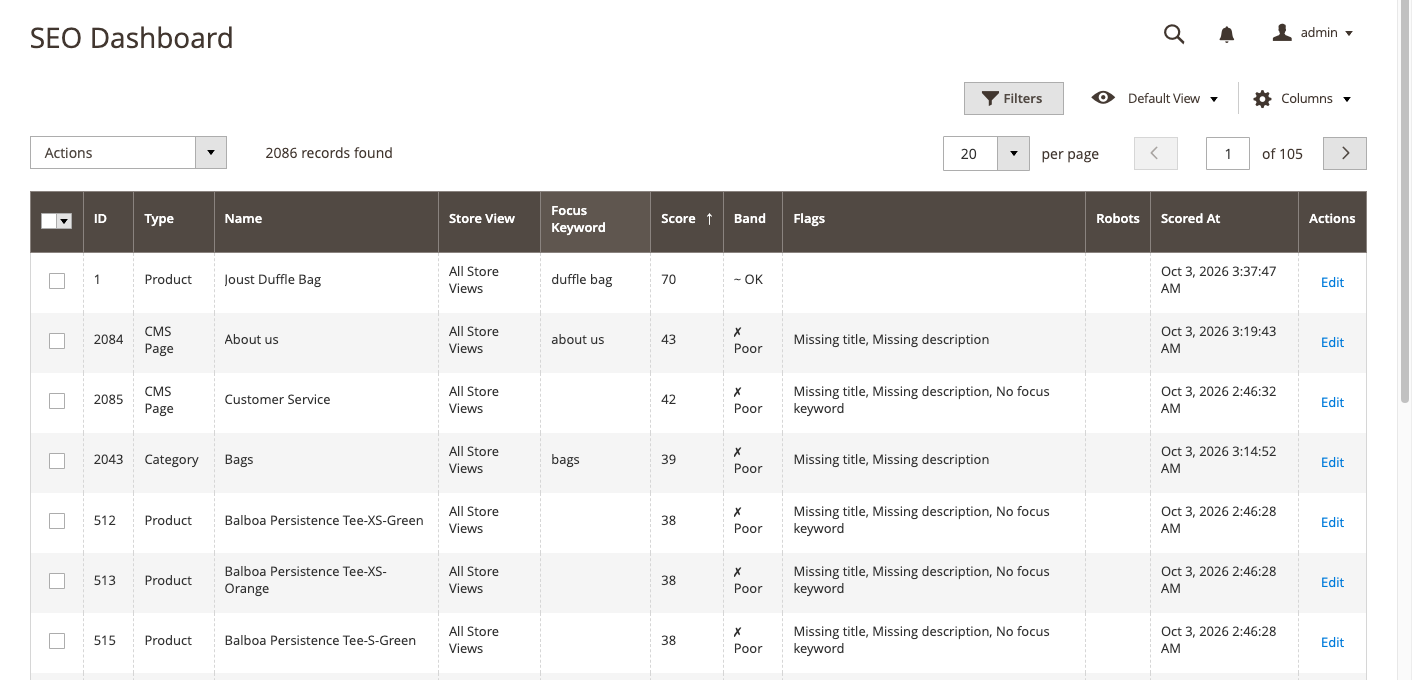
Columns
| Column | Description |
|---|---|
| ID | The record ID |
| Type | Product, Category, or CMS Page |
| Name | The name or title |
| Store View | The store view the score belongs to |
| Focus Keyword | The page’s focus keyword |
| Score | 0 to 100 |
| Band | Poor, OK, Good, or Not scored, each with an icon |
| Flags | Missing title, Missing description, No focus keyword, Duplicate focus keyword, Noindex |
| Robots | The page’s robots override, if any |
| Scored At | When the score was last calculated |
| Actions | Edit opens the page’s own edit screen, where the SEO panel is |
Sort by Score ascending to put the weakest pages at the top.
Flags
| Flag | Meaning |
|---|---|
| Missing title | The page has no meta title of its own. A meta template may still fill one in on the storefront. |
| Missing description | The page has no meta description of its own. |
| No focus keyword | No focus keyword is set, so every keyword check is skipped. |
| Duplicate focus keyword | Another item of the same type in the same store view uses the same focus keyword, so the pages compete with each other. |
| Noindex | The page’s own robots override is set to noindex, follow or noindex, nofollow. Store-wide robots rules do not set this flag. |
Filters
Filter by type, store view, band, and each flag. For example, filter Type = Product and Band = Poor to get a work list for the catalog team.
Mass actions
Select rows and choose from Actions. Both actions need the Mass Actions permission (OCMLabs_Seo::dashboard_manage).
- Re-score runs the analysis again for the selected rows.
- Set Robots sets the robots override on the selected rows to
index, follow,noindex, follow, ornoindex, nofollow, or clears it with Use Default. The affected pages’ cache tags are cleaned, so the storefront picks up the change without a full flush.
How pages get scored
There is one analysis. The live panel, save-time scoring, Re-score, the command-line tool, and the nightly job all use it, so the score on the dashboard matches what the panel shows.
- On save. Saving a product, category, or CMS page scores it just after the save commits. A scoring problem is logged and never blocks the save.
- From the command line. For pages nobody has opened since install.
- Nightly. For pages changed outside the admin, such as by an import.
Scoring from the command line
bin/magento ocmlabs:seo:rescore [--entity=product|category|cms_page] [--store=<id>] [--only-unscored]| Option | Description |
|---|---|
--entity | Score only product, category, or cms_. Default is all three. |
--store | Re-score only the existing store-view rows of this store view ID. CMS pages have no store-view rows, so none are scored with this option. |
--only-unscored | Skip anything that already has a score. |
The command works in batches of 500, emulating each store view as it goes, with a progress bar for each type. It exits with a non-zero status if any item could not be scored, so a deploy script can detect it; the details are written to var/log/ocmlabs_seo.log. The command runs even while Enable SEO Module is No.
Run it once after install, and again after changing thresholds under Analysis so existing scores reflect the new rules.
The nightly job
ocmlabs_seo_rescore_changed runs at 03:00 every night (0 3 * * *, default cron group). It re-scores items changed since their last score, plus items with no score. It needs Magento cron, does nothing while Enable SEO Module is No, and never throws, so it cannot disturb other cron jobs.
Scoring never cleans the page cache: a new score changes nothing on the storefront.