
Manage FAQs from the Magento admin grid under Catalog > Product FAQs



All FAQ management happens under Catalog > Product FAQs in the Magento admin panel. This page walks through the grid, the create/edit form, multi-product assignment, and deletion.
The FAQ grid
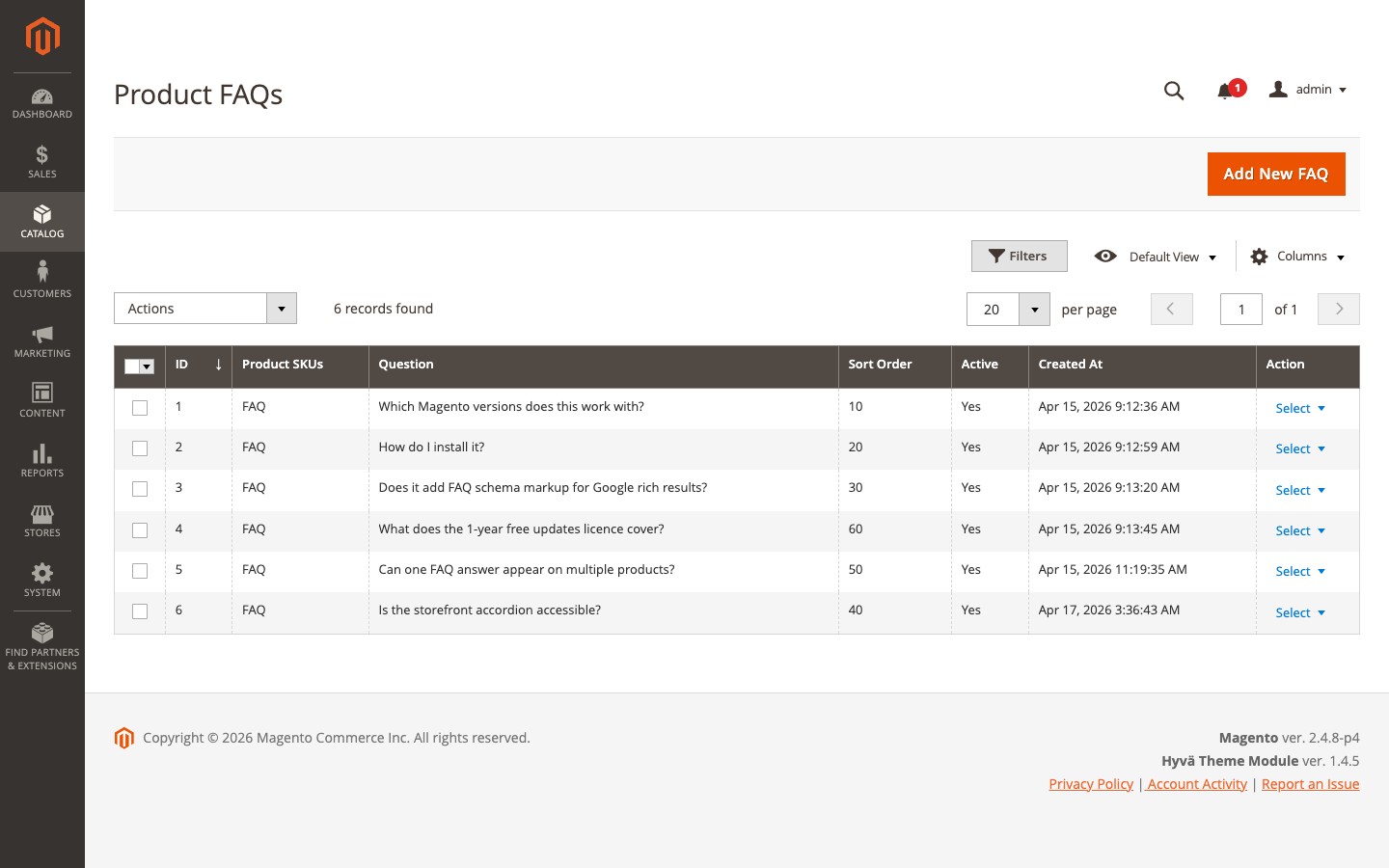
The grid lists every FAQ entry across the catalog with the following columns:
| Column | Description |
|---|---|
| ID | Auto-assigned record ID |
| Product SKUs | The SKUs this FAQ is assigned to (comma-separated) |
| Question | The FAQ question text |
| Sort Order | Display order on the product page (lower numbers appear first) |
| Active | Whether the FAQ is currently visible on the frontend |
| Created At | Date the FAQ was created |
| Actions | Edit or delete the individual record |
The grid supports filtering on every column. Use the Product SKUs filter to find all FAQs assigned to a specific product - partial SKU matches work. The Active filter lets you see what is enabled or disabled across your catalog. Created At supports a date-range filter.
Click Add New FAQ in the top-right corner to create a new entry.
Creating a FAQ
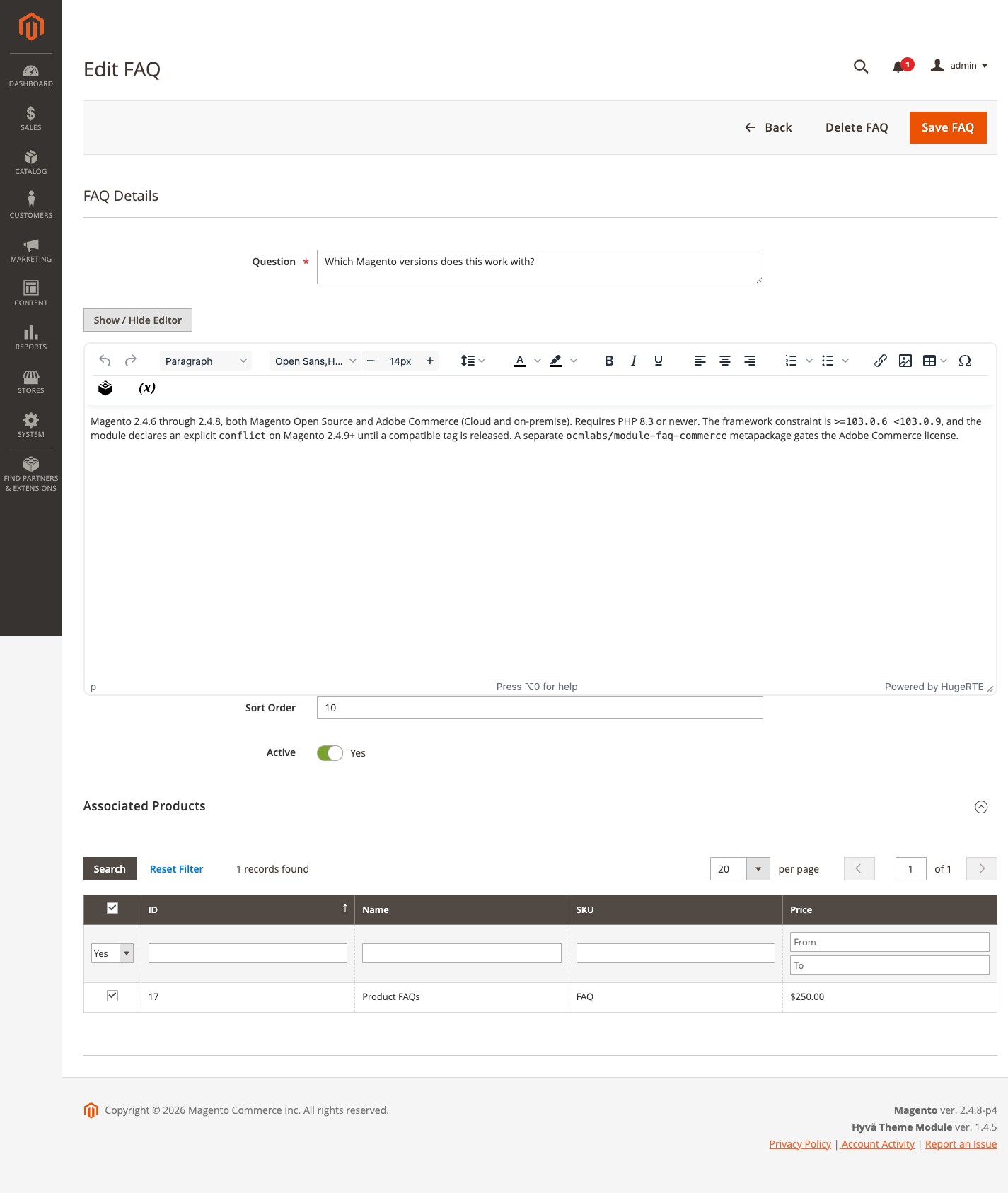
Fill in the following fields:
Associated Products (required) Use the product grid in the Associated Products section to find and select products. Check the box next to each product this FAQ should appear on. You can search and filter the grid by name, SKU, or other attributes.
Question (required) The question text as it will appear in the accordion on the product page. Plain text only is recommended, though the field accepts input freely.
Answer (required) The answer text. The field uses a WYSIWYG editor - you can format text, add bullet lists, headings, links, and insert images or other media using the editor toolbar. The HTML renders on the frontend accordion but is stripped out for the JSON-LD schema output, so rich formatting will not interfere with structured data.
Sort Order
Controls the position of this FAQ in the accordion relative to other FAQs on the same product. Lower numbers display first. FAQs with the same sort order fall back to entry order. Leave at 0 if display order does not matter.
Active (toggle) Enabled by default. When disabled, the FAQ is hidden from the product page entirely. Use this to draft FAQs or temporarily pull one down without deleting it.
Click Save to create the record. You are returned to the grid with a success confirmation.
Editing a FAQ
From the grid, click Edit in the Actions column for any record. All fields are editable. The product grid shows current assignments pre-checked - check or uncheck rows to change which products this FAQ is assigned to. Save to apply the changes across all assigned products immediately.
Assigning one FAQ to multiple products
The product grid in the Associated Products section accepts any number of selections. There is no limit. This is the primary way to reuse a single FAQ across a range of products - for example, a shipping policy FAQ assigned to every product in a category, or a care instructions FAQ shared across an entire product line.
To add a product to an existing FAQ, open the FAQ, find the product in the grid, check its row, and save. To remove a product, uncheck its row and save.
Disabling and deleting FAQs
Disable: Open the FAQ and toggle Active off. The FAQ disappears from the frontend immediately after a cache flush but remains in the database and can be re-enabled at any time.
Delete (single): Click Delete in the Actions column on the grid, or use the Delete button inside the edit form. This permanently removes the record.
Delete (bulk): Select multiple FAQs using the checkboxes on the left side of the grid, open the Actions dropdown, choose Delete, and confirm. This permanently removes all selected records.
Tips
- Reuse aggressively. The multi-product assignment model is designed for this - a “What is your return policy?” FAQ does not need to be recreated for every product; write it once and select every applicable product from the grid.
- Use sort order intentionally. The most important or most commonly asked question should be
sort_order: 0or 1 so it is the one that is pre-expanded when the page loads. - Draft with Active off. Write and assign FAQs before they go live by leaving Active toggled off, then flip it on when you are ready.
- WYSIWYG answers. Use the editor toolbar to add bullet lists, bold text, links, and images, and keep it readable - the structured data output strips tags, so rich formatting will not cause schema issues.