
Fee Revenue report, the Change Log audit trail, and day-to-day grid management



Fee Revenue report
Sales > Extra Fees > Fee Revenue lists every order that carries a fee: order number, purchase date, status, currency, fee amount (display and base), fee tax, and - the columns that answer the actual finance question - how much of the fee has been invoiced and refunded, with a View link to each order. Charged is not the same as collected; this grid shows both without opening orders one by one.
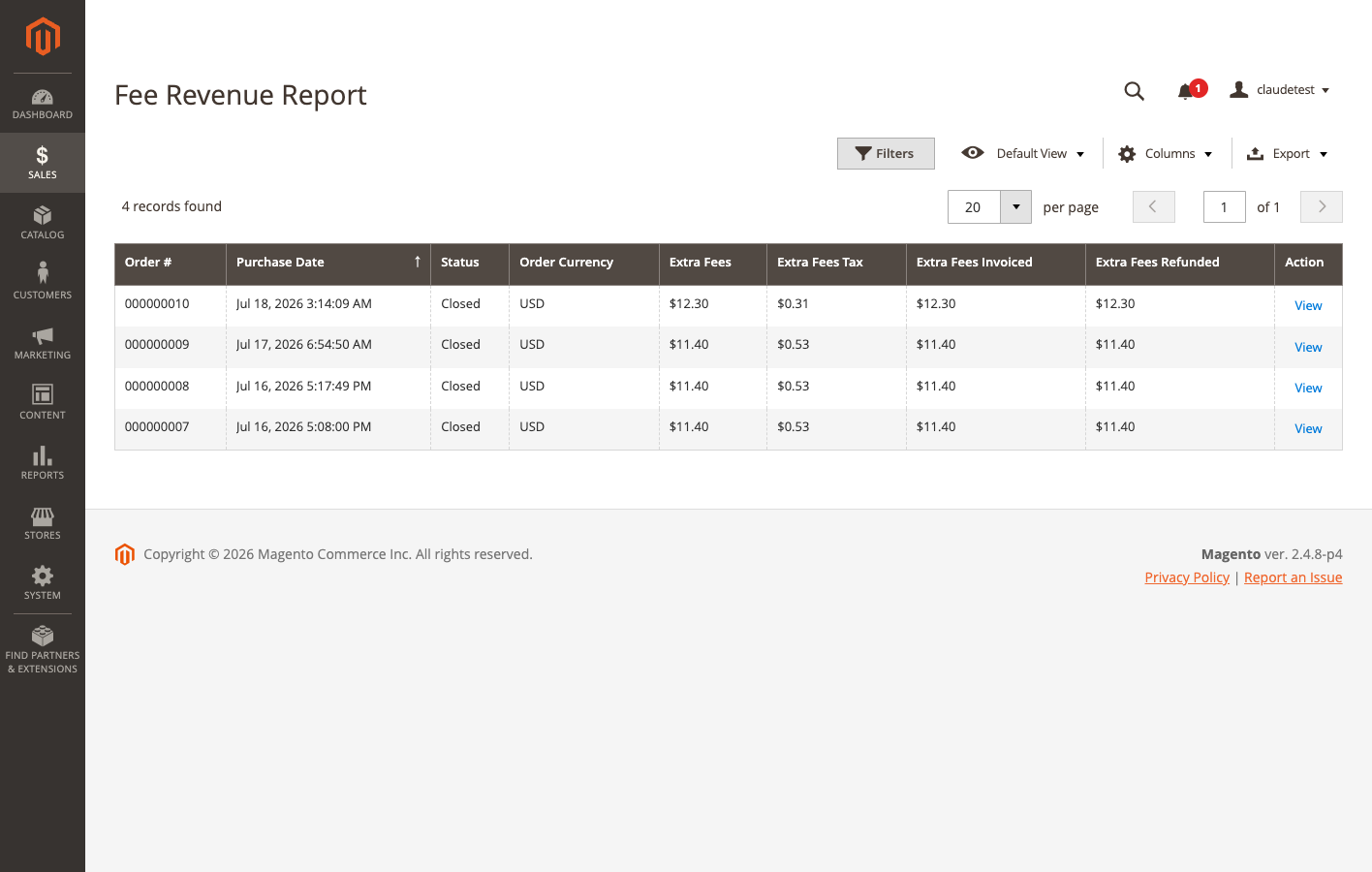
The report reads from the orders themselves (not the flattened grid table), so the tax/invoiced/refunded figures are always the live order values. It is read-only - there is nothing to edit here.
Change Log
Sales > Extra Fees > Change Log records every fee mutation: create, update, delete, enable, disable, and duplicate, with the acting admin’s username and a timestamp. Edits made through the admin form carry a field-level before/after diff of what changed - amount, conditions operator, schedule, tax settings, and so on - so “who changed this fee’s amount, and when” has an exact answer.
Fees changed through the REST API are logged too, as basic entries without an admin username (a REST token carries no admin session). Log entries deliberately survive the deletion of the fee they describe, so a since-deleted fee’s history remains inspectable.
Grid management
The fee grid at Sales > Extra Fees > Manage Fees supports:
- Filters on ID, name, type, amount, operator, taxable, optional, store view, schedule dates, and status; a Conditions column summarizes each fee’s rules inline.
- Inline editing of Sort Order and Active directly in the grid.
- Mass actions - Enable, Disable, and Delete (with confirmation) on any selection.
- Export - standard Magento grid export to CSV or XML, respecting active filters.
- Duplicate - clones the entire fee: amount, caps, conditions, tax class, schedule, store views, and store labels, named “(Copy)”. The copy is always created disabled, regardless of the source fee’s state, so it can be reviewed before going live.
Roles and permissions
Access splits into three levels under System > User Roles, plus a config resource:
- View Fees (
OCMLabs_ExtraFees::view) - browse, filter, and export the fee grid, open the fee form read-only, and use the Fee Revenue report and Change Log. For merchandising or finance staff who need visibility without edit rights. - Manage Fees (
OCMLabs_ExtraFees::manage) - create, edit, mass enable/disable, and Duplicate. Nested under View Fees. - Delete Fees (
OCMLabs_ExtraFees::delete) - delete and mass delete. Also nested under View Fees. OCMLabs_ExtraFees::config- the configuration section under Stores > Configuration.
Upgrading from a version without the view-only role changes nothing for existing roles: a data patch backfills View Fees for every role that already held Manage or Delete.