
Configure Support Tickets enable, notification, and email template settings in Stores > Configuration



Support Tickets configuration lives under Stores > Configuration > OrangeCollar > Support Tickets. All options are store-view scoped, so multi-store installations can set a different admin notification inbox, sender identity, and template selection per store view.
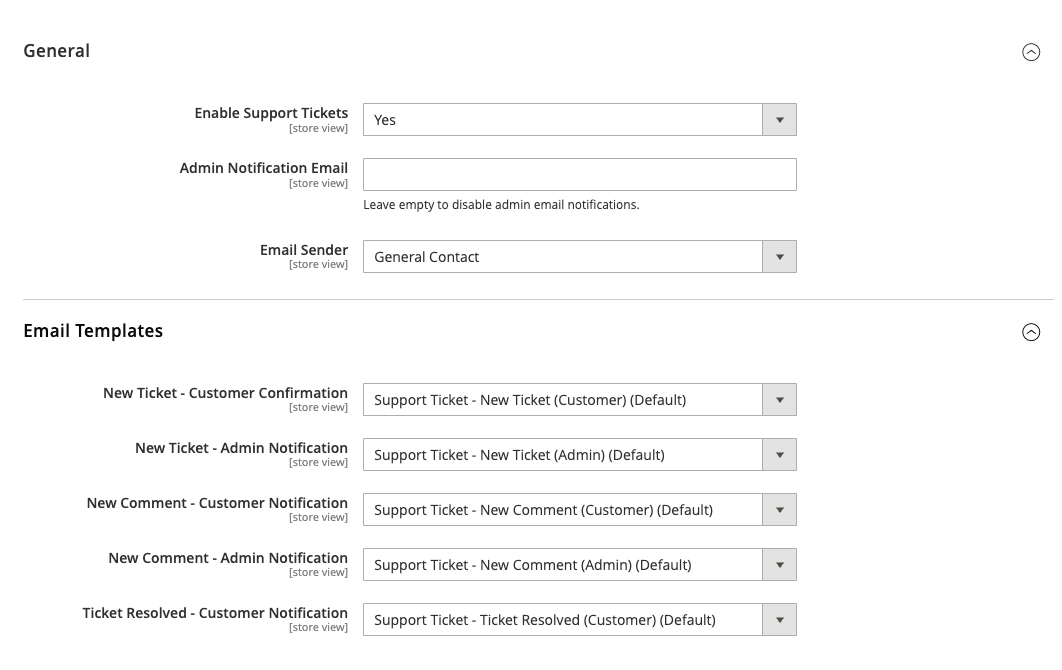
General
| Setting | Default | Purpose |
|---|---|---|
| Enable Support Tickets | Yes | Toggle the module on or off sitewide. When disabled, the frontend customer portal and the product page Support button are both hidden, and the admin controllers reject new submissions. |
| Admin Notification Email | (empty) | The recipient address for every admin-side notification: new tickets and new customer replies. |
| Email Sender | General Contact | The Magento email identity used as the sender for all five outgoing notifications. Any identity configured under Stores > Configuration > General > Store Email Addresses can be used. |
Set the Admin Notification Email before going live - a blank value means admin notifications silently fail.
Email Templates
Five selectors, one per notification event. Each defaults to a sensible shipped template. To customize any of them:
- Go to Marketing > Communications > Email Templates > Add New Template.
- Load the default template you want to override (pick it from the Template dropdown).
- Edit subject and body, save under a recognizable name.
- Return to Stores > Configuration > OrangeCollar > Support Tickets > Email Templates and select your custom template from the dropdown for that event.
| Setting | Notification event |
|---|---|
| New Ticket - Customer Template | Confirmation to the customer who just opened the ticket |
| New Ticket - Admin Template | Alert to the Admin Notification Email that a new ticket was opened |
| New Comment - Customer Template | Notification to the ticket owner when an admin replies |
| New Comment - Admin Template | Notification to admin when a customer replies |
| Ticket Resolved - Customer Template | Confirmation to the customer when their ticket is marked resolved |
All five templates receive the same variables, so any template body can reference the full ticket context: ticket_id, ticket_subject, ticket_status, ticket_priority, customer_name, customer_email, product_name, comment_message, view_url, account_url, admin_url.
Module Information
A separate Module Information panel on the same page shows the installed module version plus quick links to the ticket manager and this documentation site. Use it to confirm which version of the module is live on the store.
After changing settings
Flush the configuration cache so the admin sender and template selections are picked up by the notification service:
$ bin/magento cache:flush config Frontend toggle changes (enable/disable) also need the full page cache flushed:
$ bin/magento cache:flush config full_page